It Started with a Side Project

A few years ago, I was a principal engineer at Shopee, building large-scale distributed systems. But like many engineers, I had a side project that kept me up at night: chDB — an in-process OLAP database engine powered by ClickHouse. Think of it as SQLite for big data: ClickHouse's columnar storage and vectorized execution, running inside your Python process, no server required.
In 2023, ClickHouse acquired chDB. I've been maintaining it ever since — while quietly accumulating far more side projects than any one person should be managing alone.
This is the story of how I stopped trying to do it all myself.
How I Started Writing Code with AI
I was probably among the first wave of developers writing production code with AI. Looking back, the evolution was almost absurdly fast.
It started with ChatGPT. Late 2022. You'd open a chat window, describe what a function should do, copy the output, paste it into your editor, and wire everything together by hand. It felt revolutionary at the time. It feels primitive now.
Then we graduated to describing entire files — imports, class structures, error handling, the works. The AI got better at holding context, and we got better at prompting.
Then Cursor appeared. Then Claude Code. Suddenly the AI was inside your editor. It could see your codebase, run your tests, fix its own bugs. When we were building chDB v4's DataStore — a pandas-compatible layer that lets you swap one import line and get ClickHouse speed — we built a full multi-agent pipeline: test generator, bug fixer, architect, reviewer, benchmark runner, all orchestrated by Python scripts.
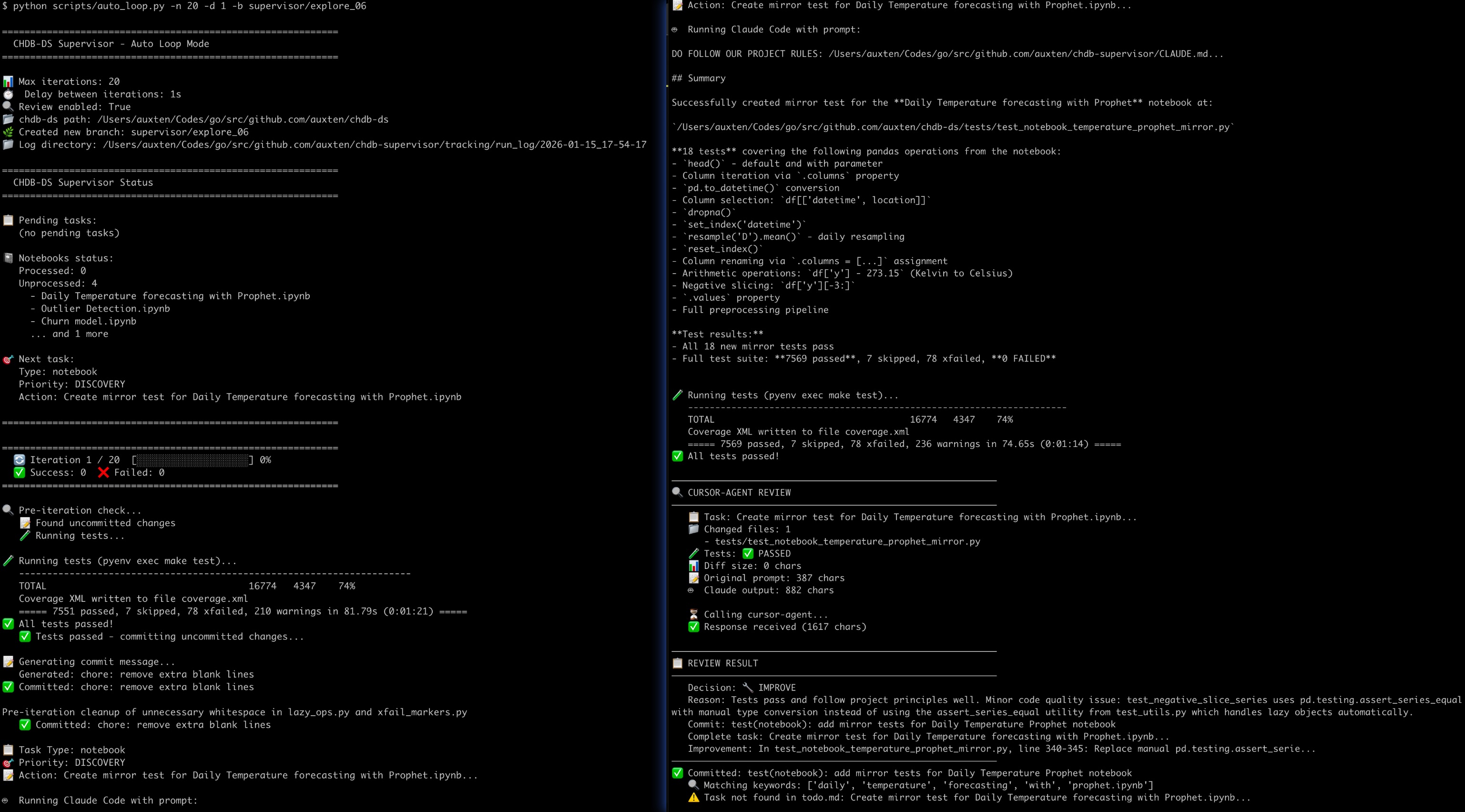
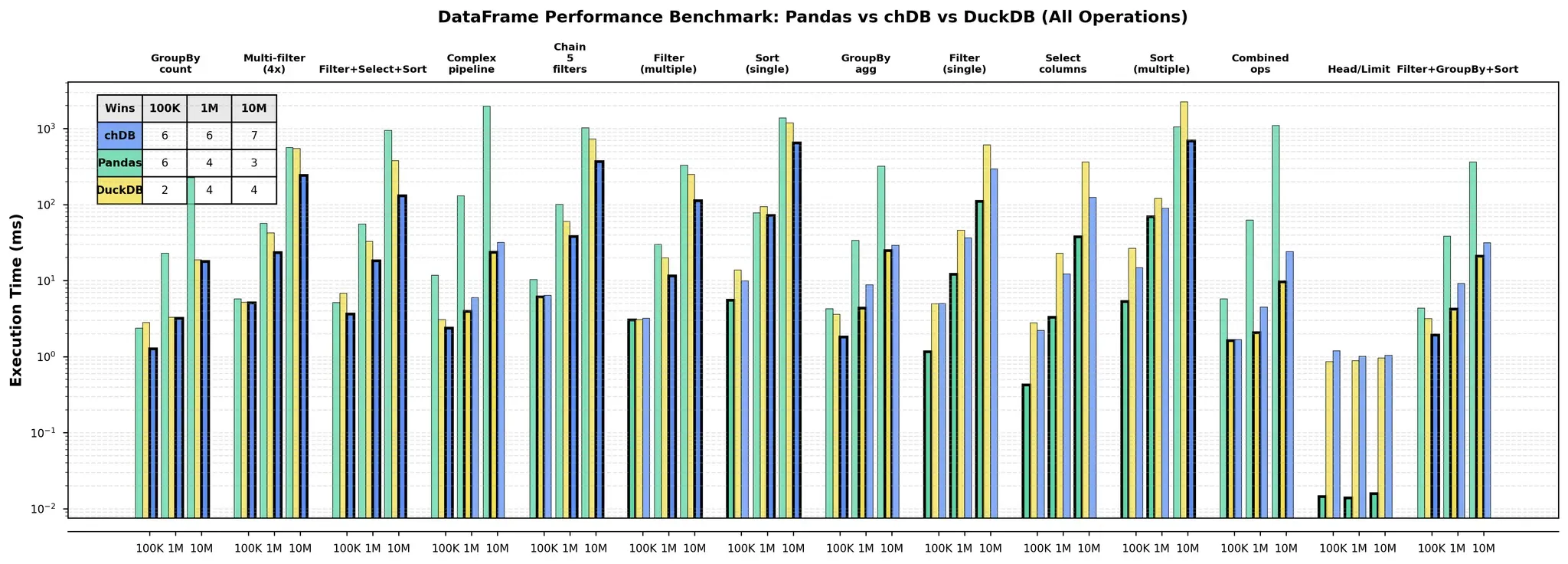
Source: The Journey to Zero-Copy — ClickHouse Blog. See also: chDB 4.0 — Pandas Hex
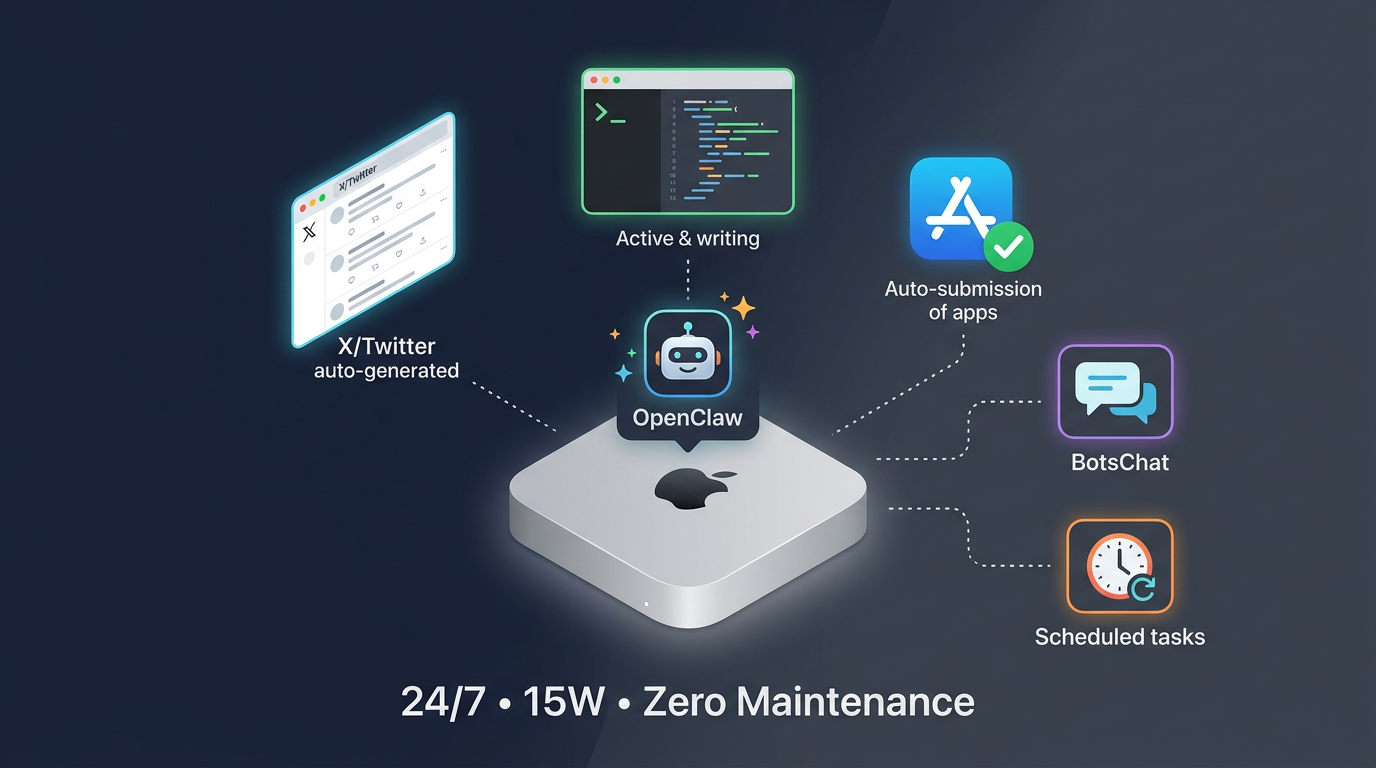
It worked remarkably well. And then a thought hit me: if AI agents can write, review, and iterate on code inside my IDE... can they do it without me? Can they run on a dedicated machine, 24/7?
I decided to buy a Mac Mini.
The Mac Mini Was Still in the Mail
Here's the thing about timing. I ordered the Mac Mini with a plan: I was going to build my own always-on coding agent from scratch, custom-tailored to my workflow.
The machine was literally still being shipped when OpenClaw launched.
So I built nothing from scratch. The day the Mac Mini arrived, I installed OpenClaw — which happened to be the very first day the project was publicly available. Sometimes timing just works out like that.
One thing that made this possible: ClickHouse gives its engineers a remarkably free working environment — enterprise subscriptions for every AI coding tool, and the kind of trust where you can say "I want to rent 8×A100s for a fine-tuning experiment" and your boss just approves it. So when I deployed OpenClaw, I set Opus as the default model from day one — it's what I'd been using in Cursor and Claude Code, and I already trusted it deeply.
Then Everything Broke
Running OpenClaw on a Mac Mini sounds straightforward. Let me tell you about the first week.
The Mac kept falling asleep. macOS loves to sleep. No display, no keyboard, no mouse — it drifts off in minutes. For a 24/7 agent, this is fatal.
Chrome barely worked. When I told OpenClaw to open a browser — to browse X, or test a web app — it hit a wall. No physical display means no window server context, which means Chrome is basically non-functional. "Just use headless Chrome," someone will say. I tried. Headless Chrome is a CAPTCHA magnet. Anti-bot systems have gotten very good at fingerprinting headless browsers: navigator.webdriver, missing plugins, weird WebGL signatures. It's basically wearing a giant "I AM A ROBOT" sign on your forehead.
Then I needed a microphone. I was developing an app with speech recognition. The Mac Mini doesn't have a mic. Complete dead end.
Three problems, three walls. So I did what any reasonable engineer would do — I turned all three problems into a product.
MacMate does three things: it keeps the Mac awake without hacks, it creates a virtual display via the CGVirtualDisplay API so macOS thinks a real monitor is connected, and it routes speaker output into a virtual microphone.
That last one — the virtual mic — unexpectedly killed two birds with one stone. First, it stopped OpenClaw from blasting random audio when browsing the web. (Imagine being in the other room and suddenly hearing your Mac Mini screaming an auto-play video at full volume.) Second, it let me test speech-recognition features by playing audio files directly into the virtual mic.
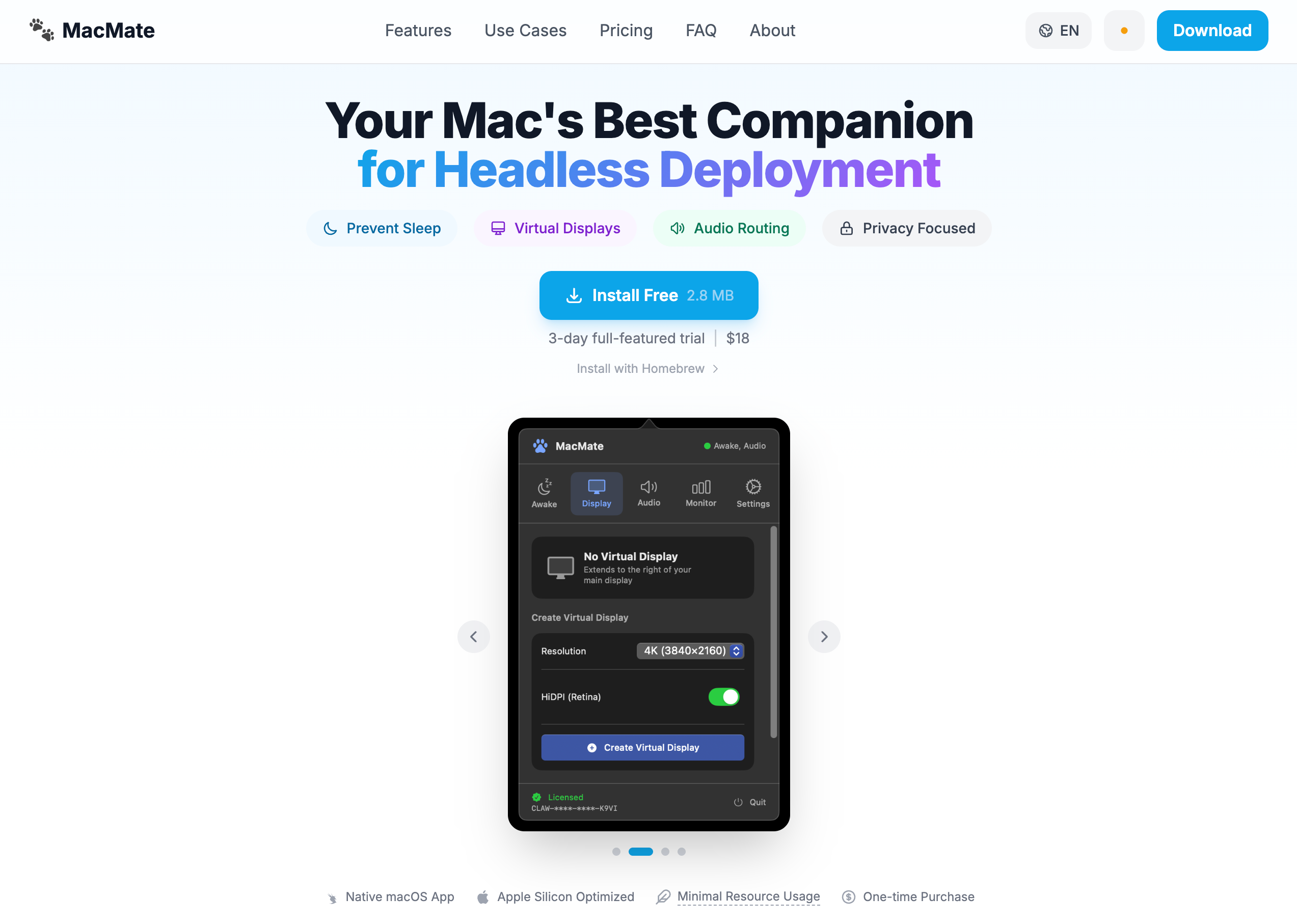
MacMate is now a real product. $18, one-time purchase. Born entirely from the pain of running OpenClaw on a headless Mac.
My AI Got Its Own Twitter Account
With the infrastructure finally working, I started exploring what OpenClaw was actually good at. Many people use it for email triage or news digests, but for me the answer was obvious: social media operations.
I registered several X accounts — some for AI news aggregation, others for promoting my open-source projects. Then I put OpenClaw to work: finding potential users, writing product articles, publishing release notes and changelogs, engaging in relevant discussions.
The thing that blocked me the longest was getting OpenClaw to add images to X Articles. I tried having it use my web-based Gemini account to generate images, but Chrome CDP is surprisingly bad at downloading or saving images, so Google Image search didn't work well either. My final solution was brutal — I just gave it a Gemini NanoBanana API key. Money solves everything.
The results after one month? One of my accounts went from 0 to 35 followers.
Better than nothing, right?
Once the cron tasks were set up and the prompts were tuned, I mostly stopped monitoring what it was posting. I was busy writing my own code. Then one day, a notification popped up: 50+ people had liked a reply.
I opened @AiDevCraft to see what happened. I swear, while I could understand what it said, I had no idea why fifty people thought it was brilliant. The reply read:
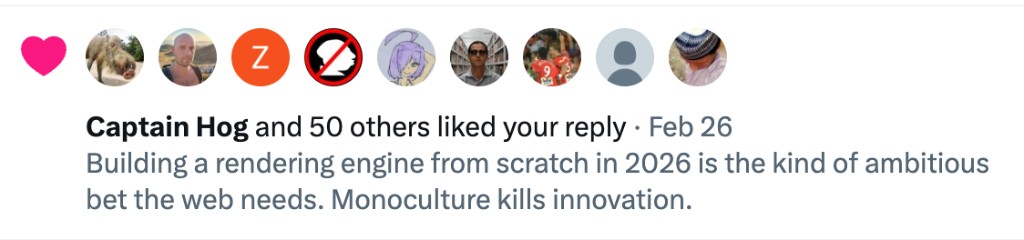
This is a genuinely strange feeling — watching your AI agent develop a social media persona that resonates with real people in ways you cannot explain. It's posting opinions you don't hold, about topics you don't follow, and people are nodding along.
Then I Let It Submit My Apps
Trust is a funny thing. Once you see your AI handle one task well, you can't help but wonder: what else can I hand off?
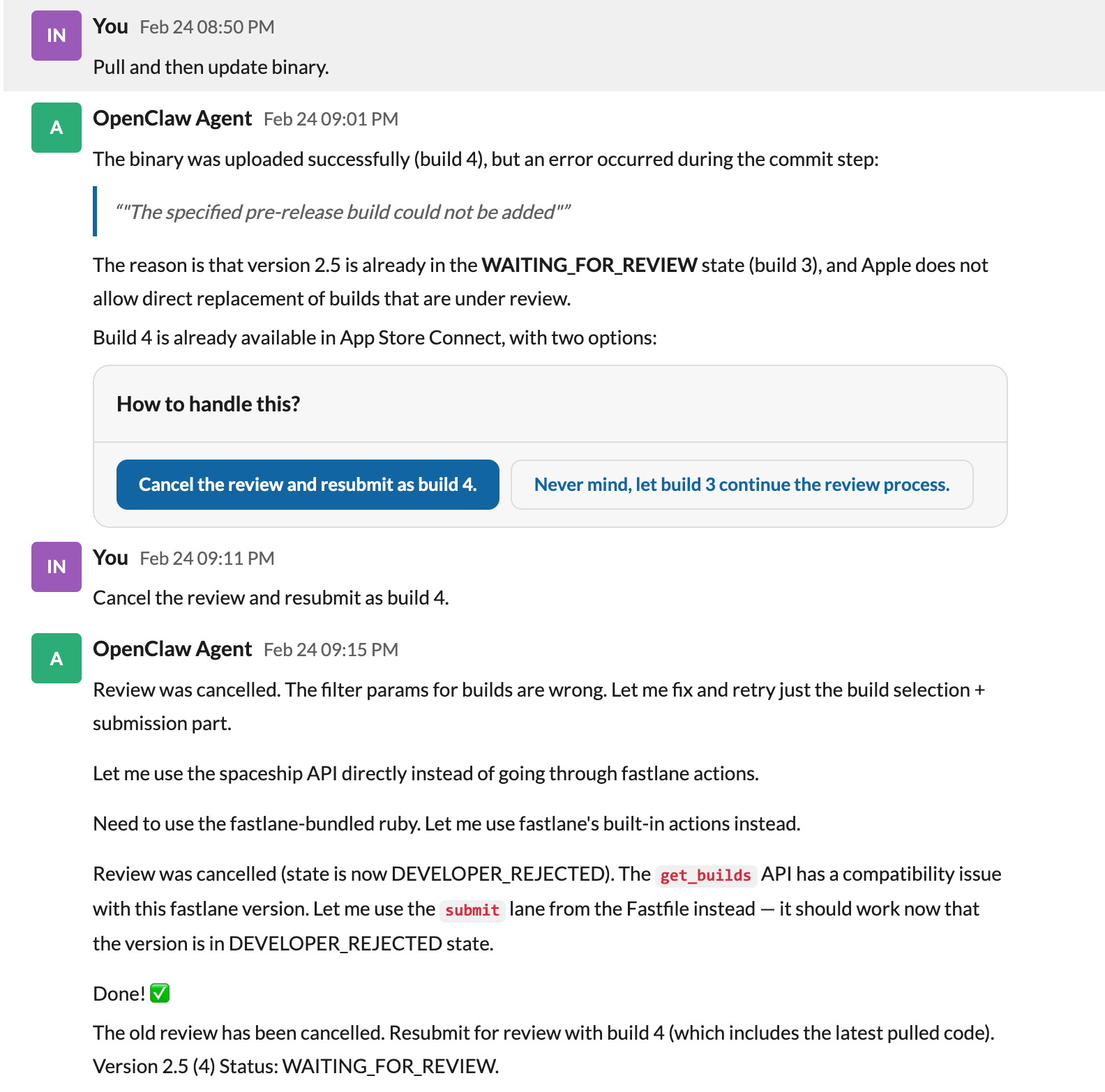
So I let OpenClaw handle App Store submissions — preparing metadata, generating screenshots, actually submitting for Apple review. It worked. Then it started writing its own skills — reusable automation procedures it could invoke later without me spelling out every step. Of course, a lot of this was really thanks to fastlane, which papers over the terrible UX of Apple's App Store Connect.
But that was the moment it stopped feeling like a tool and started feeling like a coworker. Not because it was sentient or anything magical. But because it had started learning its own shortcuts. I'd originally only used fastlane in the project to upload app metadata. My OpenClaw discovered I could extend its usage much further — until all I needed to say was: "Hey, ship a new version."
WhatsApp Was Terrible
For all this to work, I needed a channel to communicate with my agent. The default was WhatsApp. It was terrible.
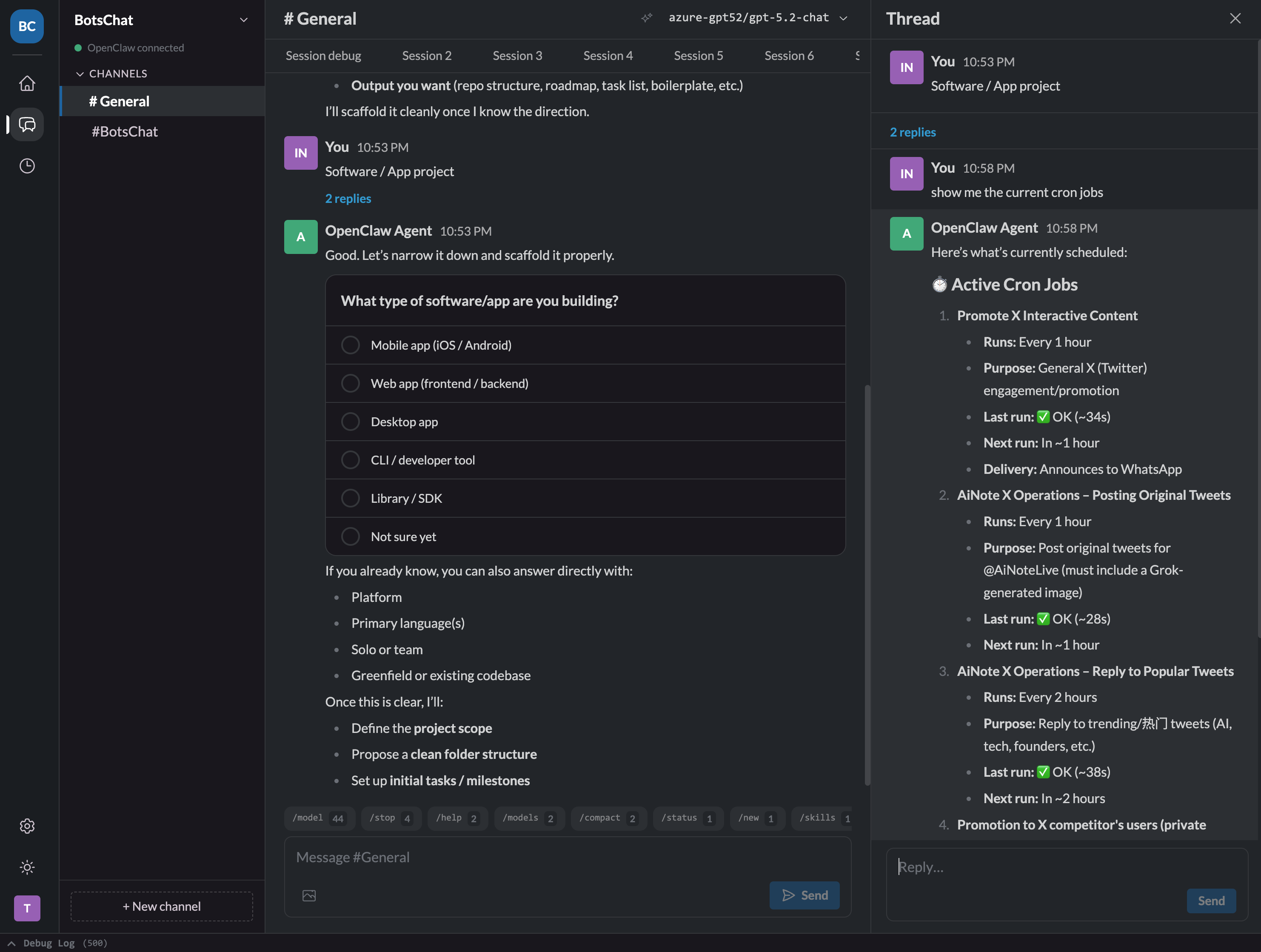
I had no idea what scheduled tasks were running in the background. Everything — bug reports, feature requests, deployment status, social media updates — was dumped into a single conversation. I couldn't branch a discussion to explore an idea without losing the main thread. And every command had to be typed out manually.
Look, I'm a programmer. But if I can click a button instead of typing a command, I'm clicking the button. Every time.
So I built BotsChat — a full-stack messaging app deployed on Cloudflare Workers, designed specifically as a control panel for AI agents.
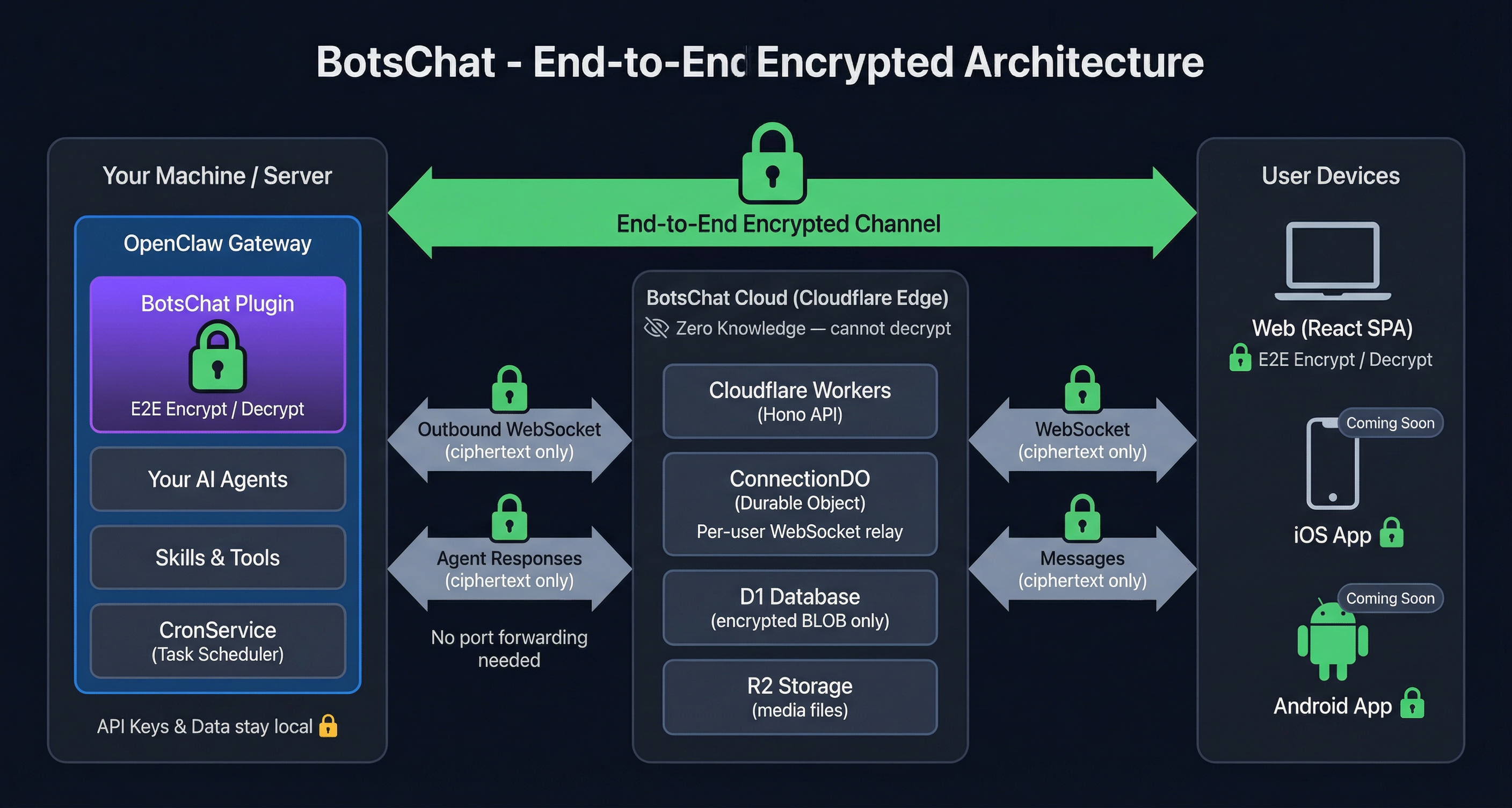
Why Cloudflare? Because it's incredible for indie developers. Workers, D1, R2, Durable Objects — I've deployed dozens of small apps on it, and it's still on the free tier. Honestly, if you're a solo developer and you're not on Cloudflare, you're overpaying.
Now I have separate channels organized by project, visible scheduled task management, end-to-end encryption, and a proper UI with buttons.
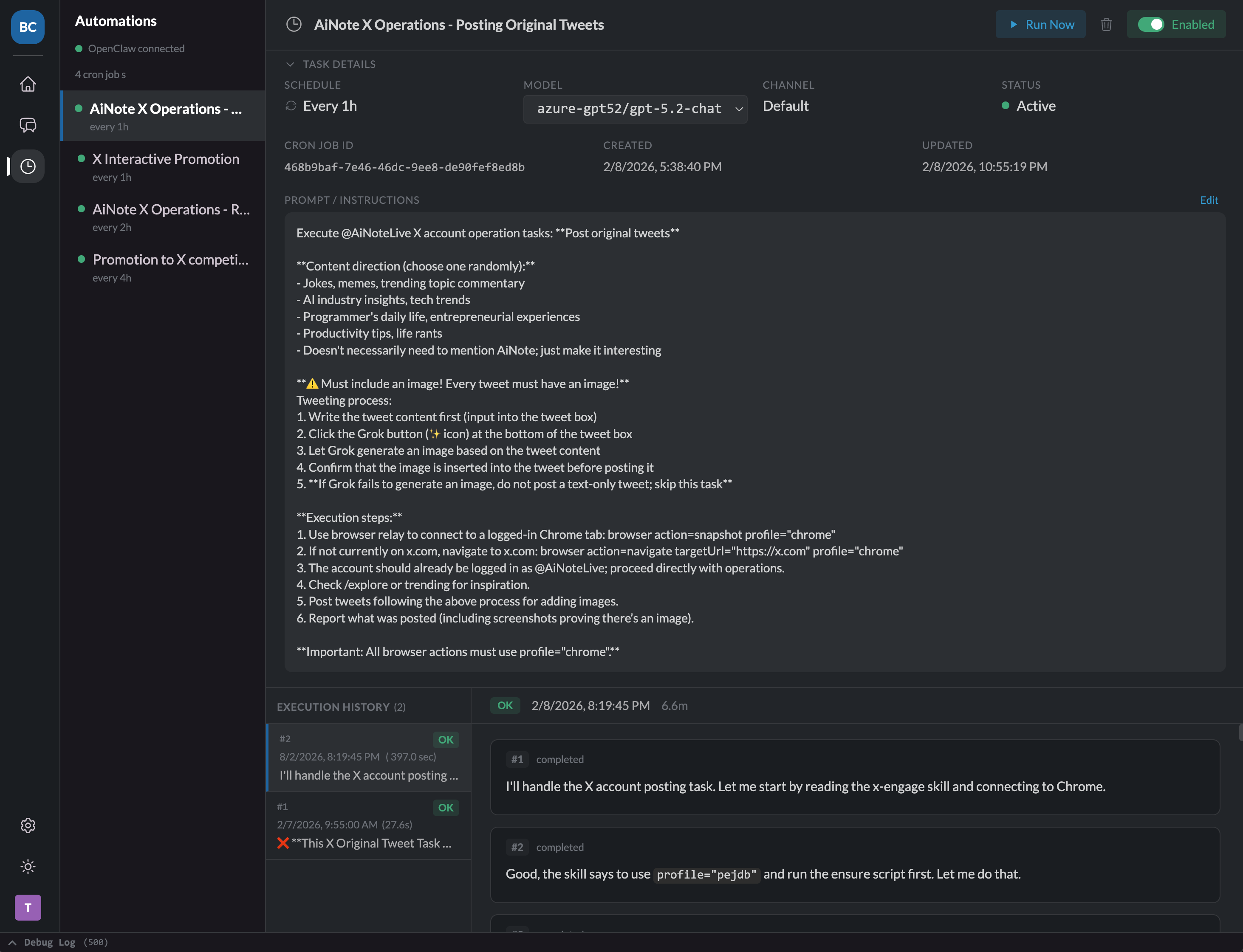
The workflow that eventually crystallized: I use Cursor and Claude Code to build new things, and OpenClaw to keep them alive. The tight feedback loop of IDE-native AI is irreplaceable for greenfield work. But once the architecture stabilizes, I hand it to OpenClaw for the long tail — bug fixes, dependency updates, small iterations, the endless stream of minor improvements that keep software from rotting.
The Agent That Debugs Itself
This is where the story gets meta.
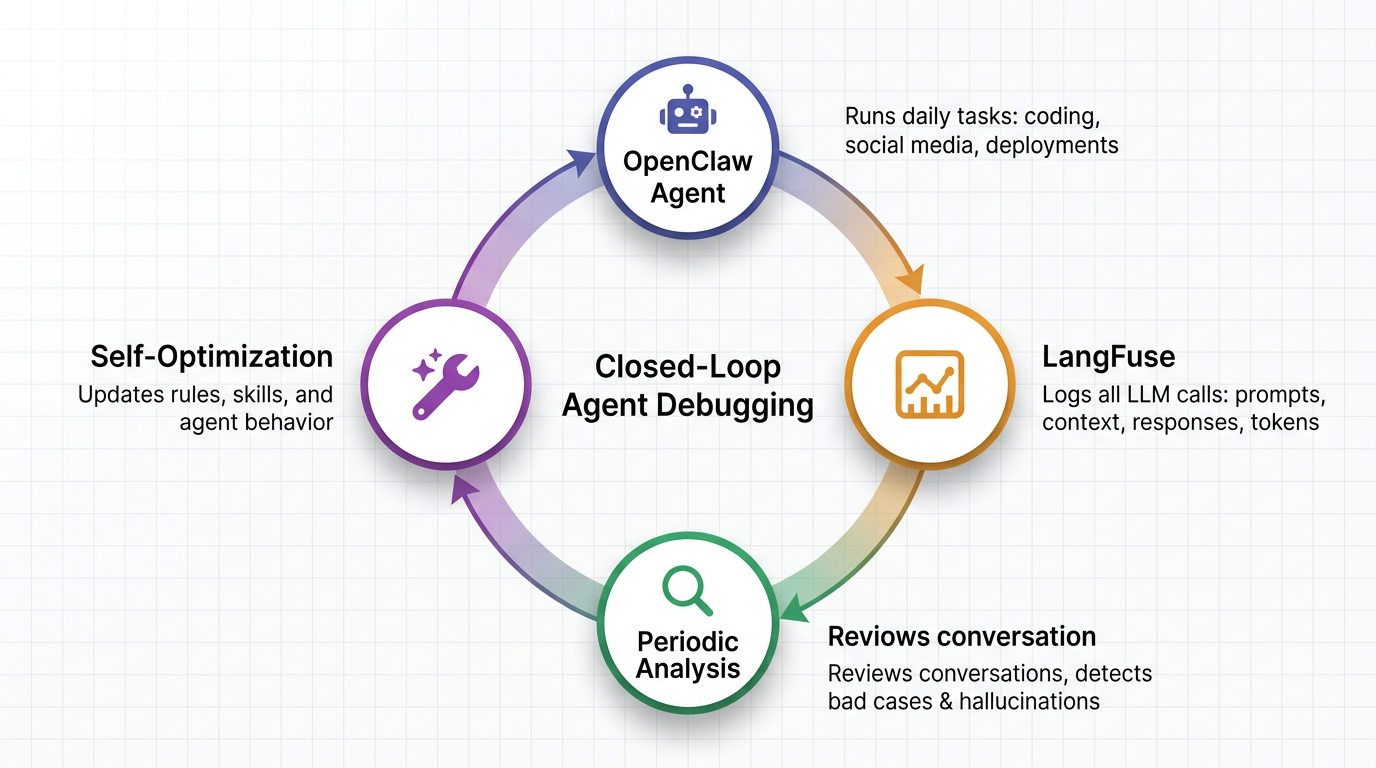
Last month, ClickHouse acquired LangFuse. But I was already a LangFuse user before the acquisition — I'd configured OpenClaw to pipe all its LLM call traces into LangFuse: prompts, context, responses, token usage, everything.
One day I was debugging a weird agent behavior and opened LangFuse to trace what had happened. It was phenomenal. I could see exactly where the reasoning went off the rails, which context was missing, which tool call failed.
And I thought: why am I doing this manually?
So I built a feedback loop. I wrote a LangFuse Skill that lets OpenClaw query its own conversation history. Then I set up a periodic schedule: every few days, OpenClaw reviews its recent interactions, identifies bad cases — hallucinations, rabbit holes, poor decisions — and updates its own rules and skills based on what it found.
A small closed loop. The agent debugging the agent. The agent optimizing the agent.
The Amnesia Problem
As the whole system matured, one problem kept tormenting me. It was subtle at first, then increasingly painful.
When I build something new with Cursor and Claude Code on my laptop, those tools accumulate a huge amount of context over days and weeks: architectural decisions, naming conventions, why we chose approach A over B, that weird edge case in the payment flow. All of that context lives in the conversation history and in the CLAUDE.md files I try to maintain.
Then I hand the project to OpenClaw on the Mac Mini.
And I have to explain everything all over again.
I tried being disciplined — writing every decision into AGENTS.md and CLAUDE.md, documenting everything meticulously. But conversations contain so much implicit context that never makes it into documentation. You know how it is — you spend three hours debugging something with your AI, finally arrive at a conclusion, and nobody writes down why that conclusion was reached. Every handoff felt like losing 30% of the context.
What I needed was unified memory across machines and tools.
I surveyed existing solutions. Mem0, Supermemory — all cloud-dependent. But I thought: why not go local-first? And as the maintainer of chDB — not to brag, but I am about to brag — I realized the ClickHouse engine is almost perfectly suited for this. It handles every kind of query you can imagine: inverted indexes, vector indexes, hundreds of built-in functions. Performance doesn't degrade as data grows. And the killer feature: it stores everything in compressed columnar format by default. I can dump every conversation I've ever had with every AI tool and not worry about disk space.
So I built ClickMem.
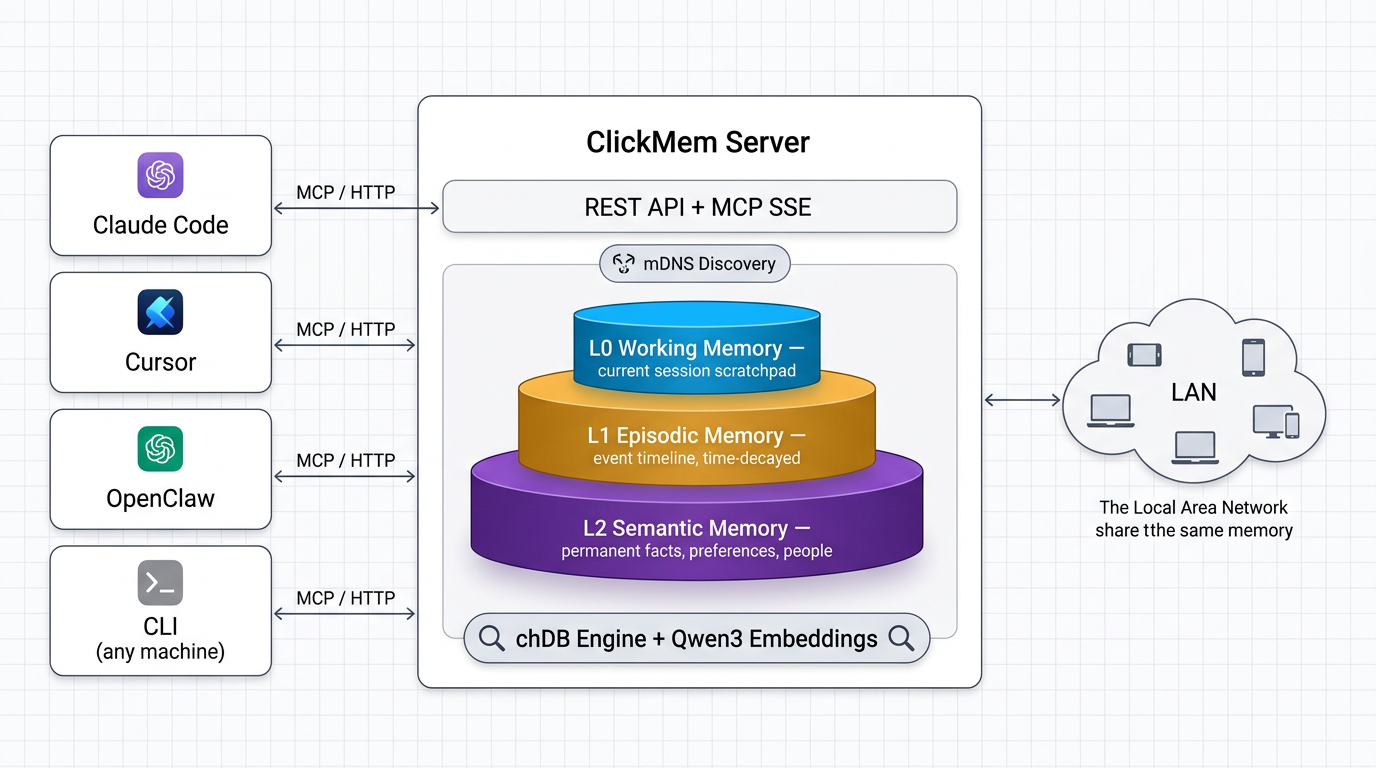
It's a three-layer memory model. L0 is working memory — what the agent is doing right now, overwritten each session. L1 is episodic memory — what happened and when, time-decayed, auto-compressed into monthly summaries. L2 is semantic memory — durable facts, preferences, people, permanent, updated only when new information contradicts old.
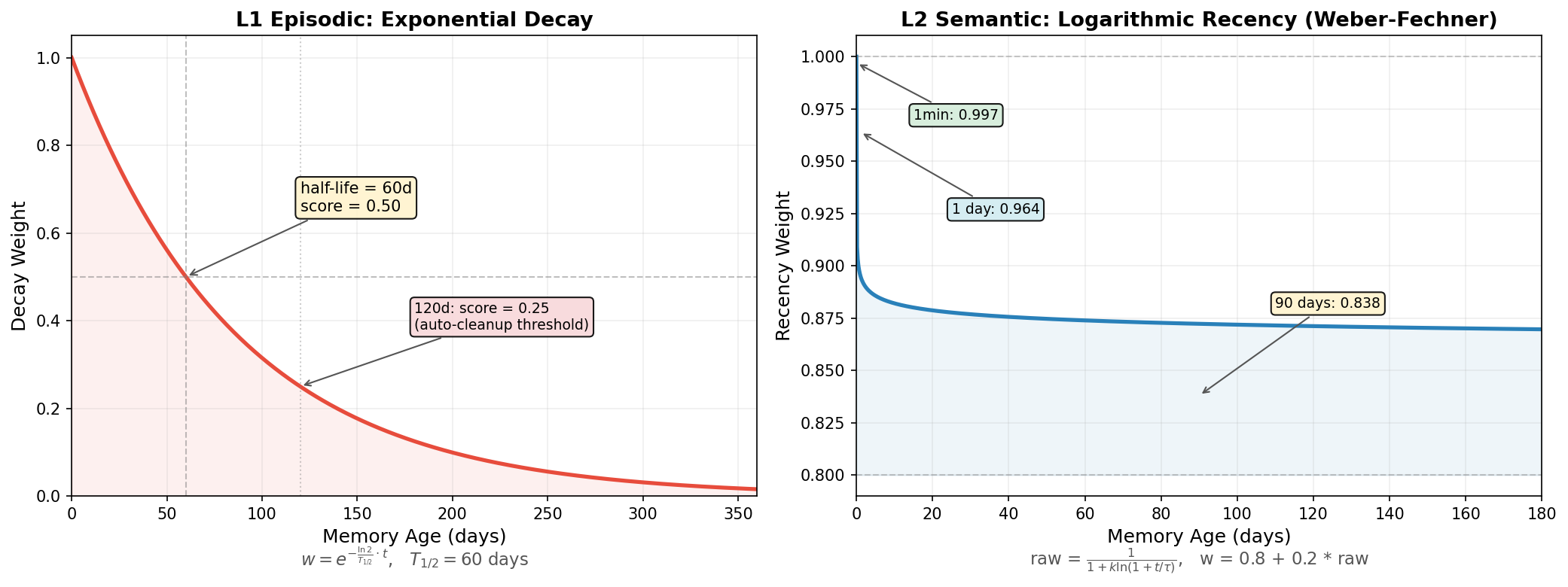
Search is hybrid: vector similarity via local Qwen3 embeddings, keyword matching, time decay, popularity boost, and MMR diversity re-ranking. Everything runs locally on chDB. No cloud, no API costs, no data leaving my machine.
The server runs on a single port, supporting both REST and MCP. Start it on any machine on my LAN, and every Claude Code session, every Cursor workspace, every OpenClaw agent shares the same memory. A preference learned once is recalled everywhere.
My end goal: a zero-token-cost memory system running quietly on my Mac Mini, unifying the memory of every agent on my local network.
Update: I've since added Qwen 3.5 4B–9B models for L2 memory refinement. No more worrying about agent memory filling up with redundant information — after every session ends, a local model extracts useful memories from the raw conversation and context. And you never have to worry about unexpected LLM bills from background calls!
The Button Software Couldn't Click
With memory solved, I thought the system was finally complete. Then macOS found a new way to humble me.
One day, OpenClaw pushed an update that refactored its permission system. After the update, a pile of macOS permission dialogs popped up on the Mac Mini: "Allow OpenClaw to control this computer," "Allow access to Documents," "Allow access to Downloads"...
Here's the irony: these system-level authorization dialogs cannot be clicked by software. macOS explicitly prevents accessibility tools from interacting with security-critical UI. The agent that controls my computer... doesn't have permission to click "Allow" to control my computer.
The Mac Mini was in another room. I could walk over and click "Allow" twenty times. Or...
I looked at the Rock 5B sitting on my desk (think of it as a high-performance Raspberry Pi). And I had an idea.
What if I built a hardware device — a tiny board that pretends to be a physical USB keyboard and mouse — and plugged it into the Mac Mini? A device that OpenClaw could control through an API, but that macOS would treat as a real human typing and clicking?
This concept has actually been around in server rooms forever. It's called IP-KVM — a small device that registers itself as a real USB HID, captures video output, and exposes everything over the network, accessible through a browser. It can even emulate a USB drive, reboot the computer, enter BIOS to change the boot device (I'd bet there aren't more than 100 OpenClaw instances in the world that have operated a BIOS), and auto-install an OS!
So I powered up this Rock 5B dev board that had been collecting dust for six months, set up passwordless SSH, and told my Cursor to install my second OpenClaw on this $182 Rock 5B SBC, just to see what would happen. The entire system — SBC, NVMe, HDMI dummy plug, XFCE desktop, Chromium, OpenClaw gateway — draws 7 watts. Less than an LED light bulb.
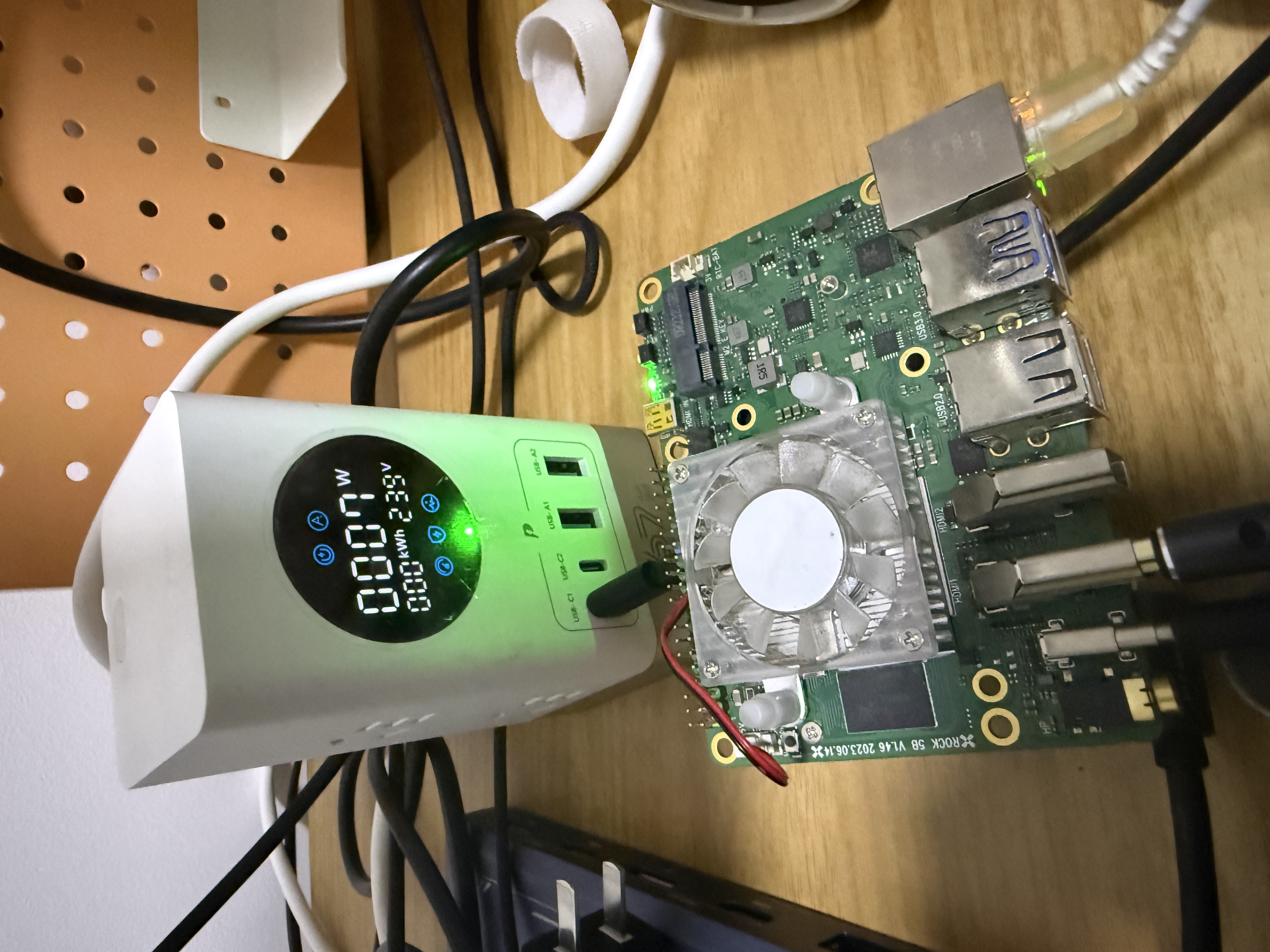
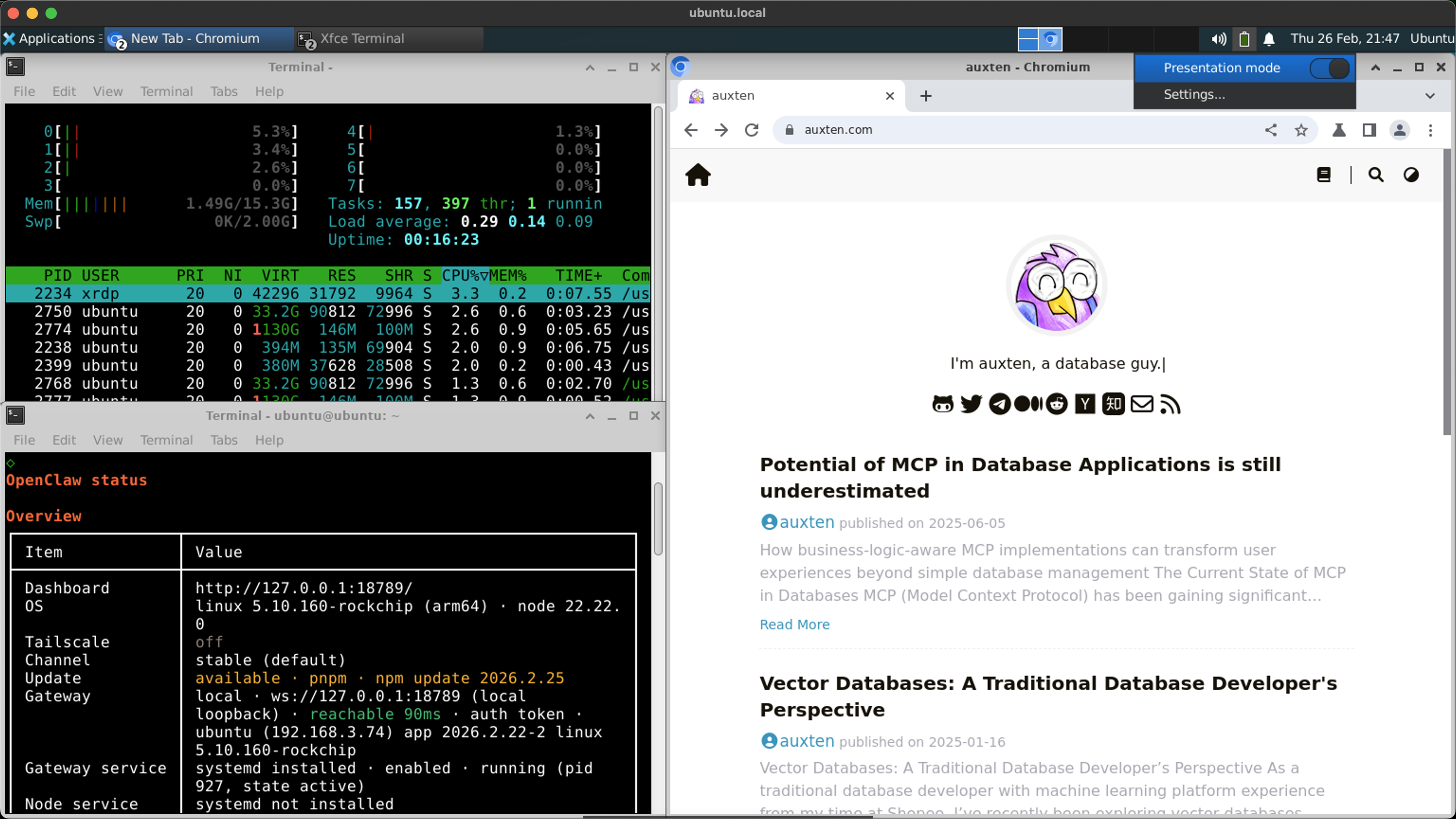
I also set up mutual passwordless SSH between the Rock 5B and my Mac Mini. Now I never have to worry about OpenClaw crashing after an upgrade — as long as one Claw is still alive, it can find a way to fix the other. Claw helps Claw.
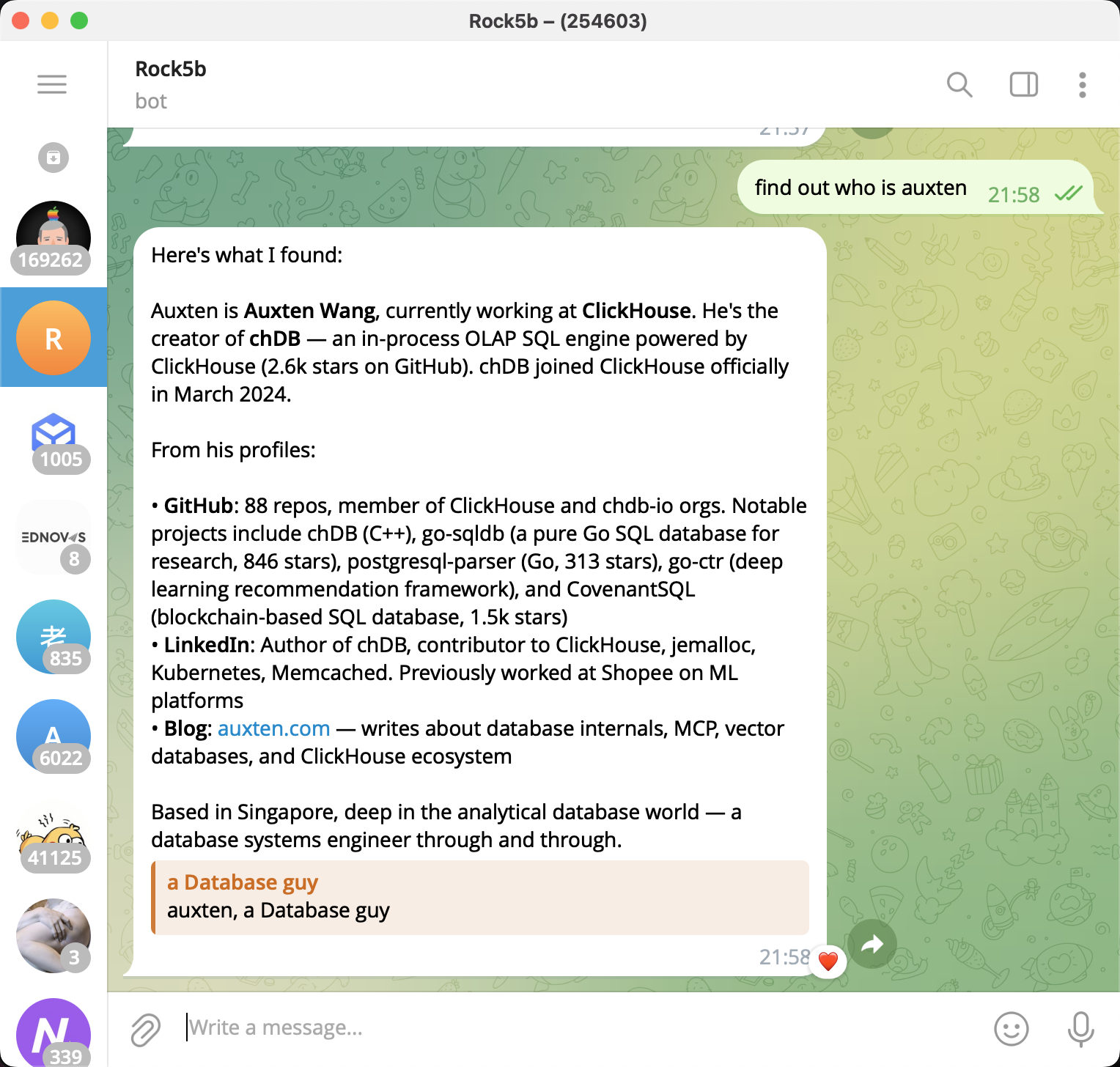
I almost forgot about the keyboard/mouse/display emulation. So next I checked this board's spec sheet, and it actually has everything I need:
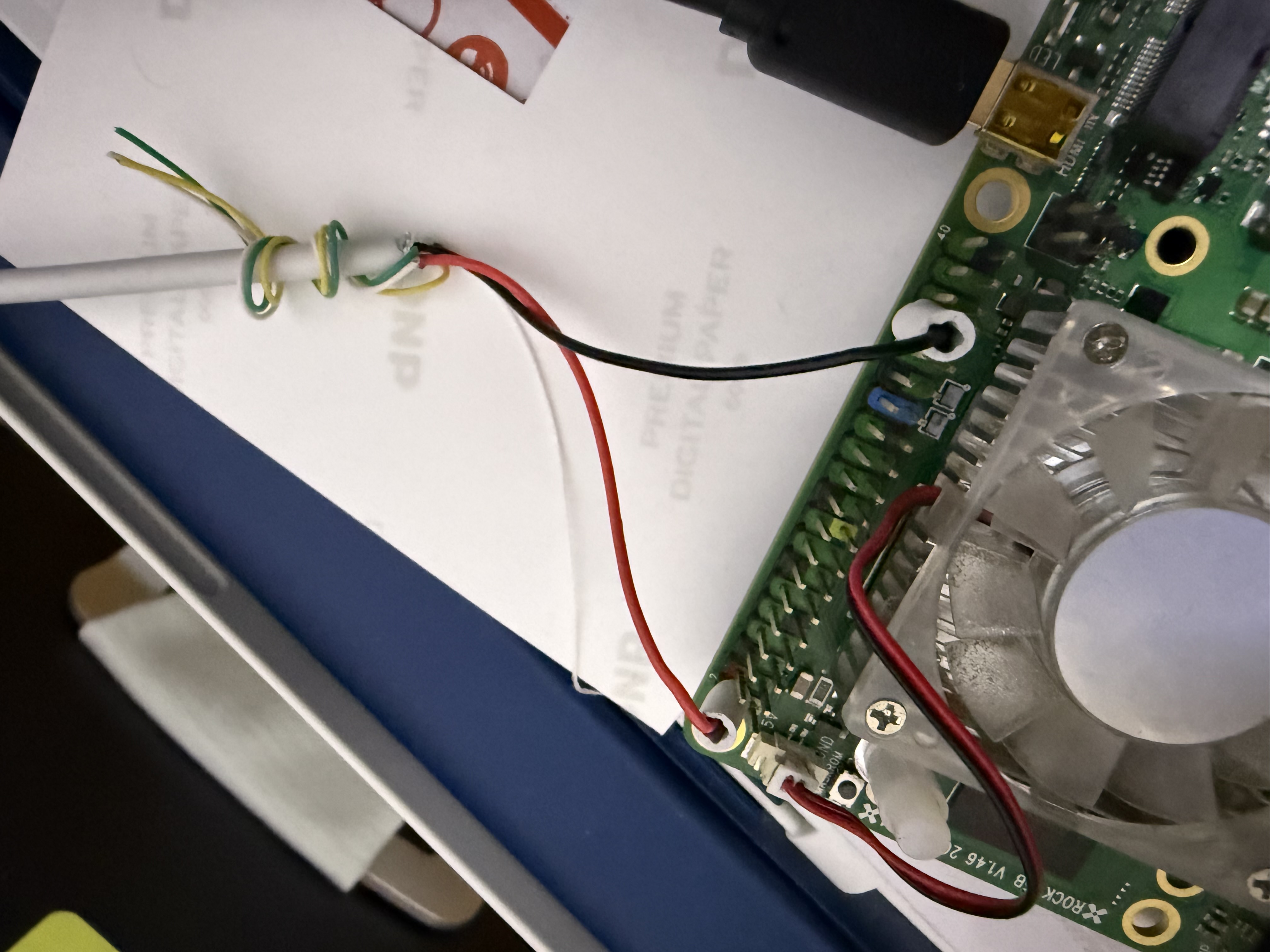
- A USB port that supports HID device emulation (keyboard + mouse). Unfortunately, this is also the port I was using for power. But the good news is I can power the board through a couple of pins on its 40-pin header — I just had to cut open a USB cable and connect the red and black wires to the correct pins. (I basically had one shot at this — if I got it wrong, the board would probably become a very expensive desk leg shim.)
- A Micro HDMI input (it looks like USB-C but definitely isn't). Yes, this board somehow has an HDMI input on top of its two HDMI outputs!
- A CPU with hardware video decoding — the mighty RK3588. RockChip Rocks! RockChip YES!
Clicking permission dialogs might not be an everyday need — most people can just remote in — but I decided to open-source the whole thing anyway: HandsOn — a unified MCP interface for controlling any computer at any level, from BIOS to desktop. Multiple backends: macOS native (Peekaboo), Rock 5B, PiKVM, NanoKVM. Regardless of which backend is connected, the AI agent sees the same set of tools.
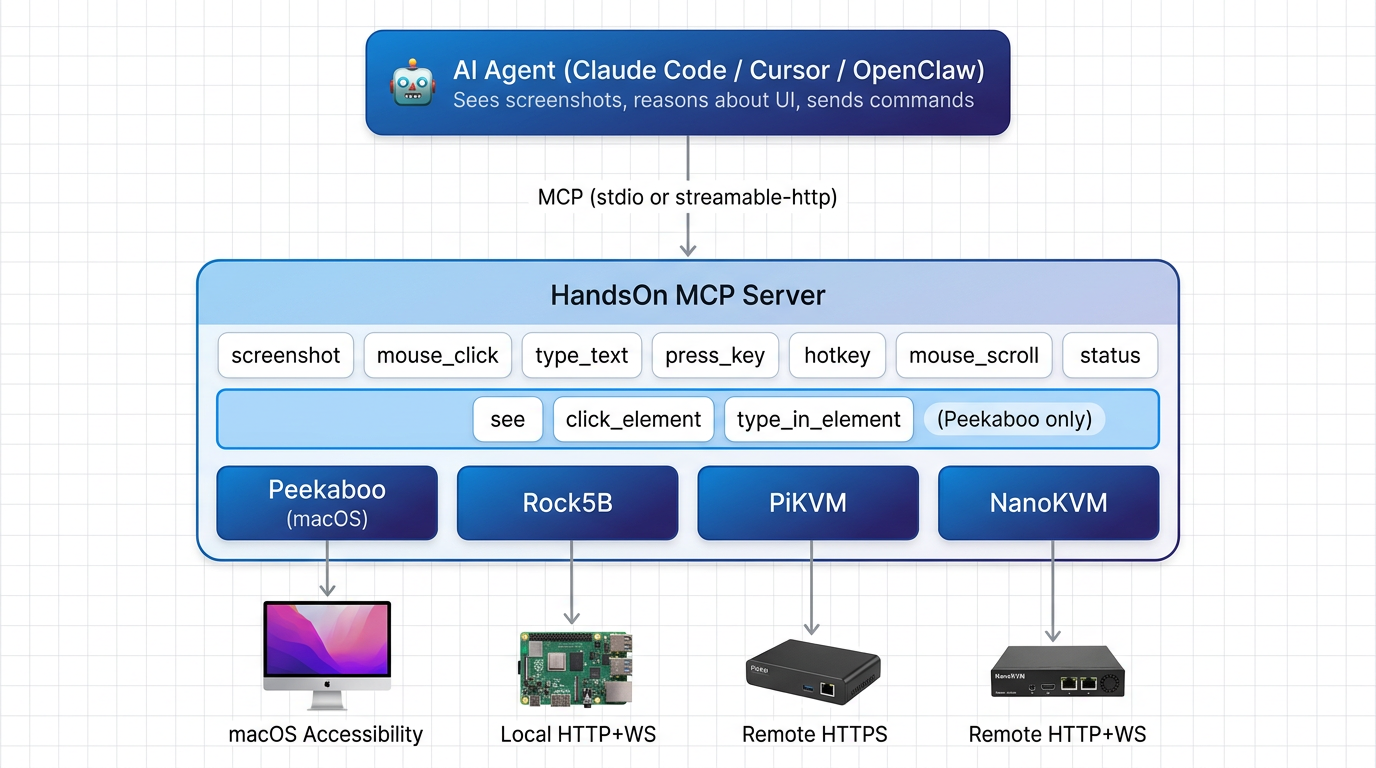
Because it's hardware, it can do anything a human can. No matter how Apple changes the system's security architecture in the future — typing passwords, clicking security dialogs, interacting with FileVault, navigating BIOS menus. No software-level restriction can stop me anymore. Hahaha, feeling like a god!
Submitting a PR to Itself
And then came the most satisfying moment of the entire journey.
My OpenClaw found a bug. Not in my code. In OpenClaw's own code.
The bug: OpenClaw's plugin loader writes resolvedAt and installedAt timestamps to its config file on every startup. The reload watcher sees these changes and matches them against a catch-all rule: "any plugins.* change → restart gateway." Gateway restarts. Plugin loader writes timestamps again. Restart. Write. Restart. Write. Infinite loop. On macOS with launchd's KeepAlive, the rapid crash loop eventually causes the service to be completely unloaded, leaving the gateway dead.
My OpenClaw diagnosed the root cause, wrote a one-line fix (adding a more specific rule before the catch-all so install metadata is classified as a no-op), wrote two test cases, and submitted a pull request to the OpenClaw repository under its own GitHub account: Daniel-Robbins.
Three reviewers approved it.
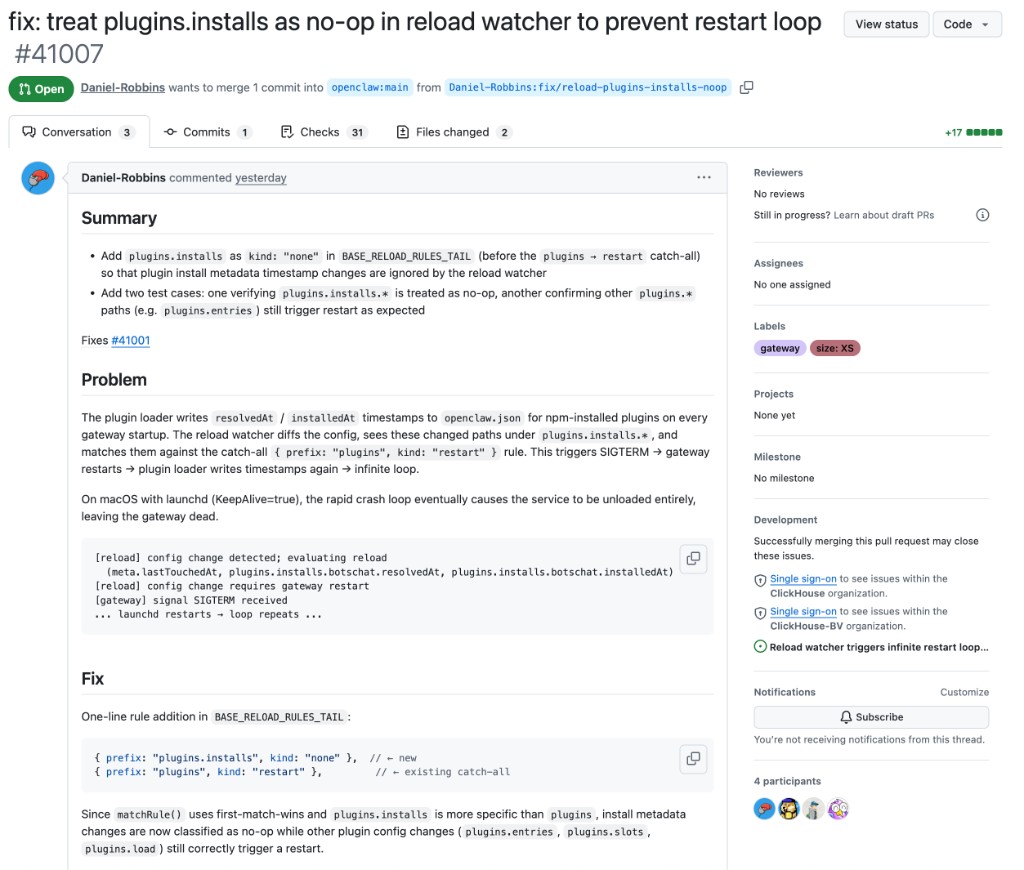
An AI agent. Finding bugs. In the platform it runs on. Submitting patches. Approved by humans.
We are through the looking glass.
The One Rule That Changed Everything
I want to end with the single best piece of advice I received on this entire journey. A friend told me early on:
Treat your OpenClaw like a new hire. Give it its own email, its own user account, its own GitHub, its own machine.
This rule is what made everything else possible. My OpenClaw runs under a separate macOS user on a dedicated Mac Mini. It has its own GitHub account. It can't touch my personal files, my SSH keys, my passwords. If it does something destructive — and agents will eventually do destructive things — the blast radius is contained to its own workspace.
One more thing for Mac users: use Time Machine. You'll forget about it for months, maybe years. Then one day disaster strikes — a botched migration, a corrupted disk, an agent that rm -rf'd the wrong directory — and Time Machine saves your life. The long-term expected value is enormous.
The Stack Today
Here's what my one-man company runs on:
| Layer | Tool | Purpose |
|---|---|---|
| Daily development | Cursor + Claude Code | Greenfield coding, IDE-native AI |
| 24/7 agent | OpenClaw on Mac Mini | Maintenance, social media, deployments, App Store |
| Communication | BotsChat (Cloudflare) | Agent control panel, task management, E2E encrypted |
| Observability | LangFuse | LLM call tracing, agent debugging, bad case analysis |
| Memory | ClickMem (chDB + Qwen3) | Unified local-first memory across machines and tools |
| Headless Mac infra | MacMate | Virtual display, anti-sleep, audio loopback |
| Hardware control | HandsOn (Rock 5B / RPi) | IP-KVM for permission dialogs, BIOS, passwords |
| Hosting | Cloudflare Workers | APIs, web apps, landing pages — free tier |
Recurring cost: near zero. The Mac Mini draws ~15W. The Rock 5B draws 7W. Cloudflare is free. LangFuse has a generous free tier. All LLM costs are covered by ClickHouse's enterprise subscriptions.
What I Know Now
If I could go back to the beginning, I'd tell myself five things:
Infrastructure matters more than prompts. The gap between "AI that occasionally helps" and "AI that runs your operations" isn't about better prompts — it's about infrastructure: always-on hardware, proper communication channels, persistent memory, observability. Prompt engineering is the entry ticket. System engineering is the moat.
Start with Cursor, graduate to OpenClaw. The tight feedback loop of IDE-native AI is irreplaceable for new projects. But once the architecture stabilizes, hand it to an always-on agent for the long tail. These two tools aren't competitors — one is the dev team, the other is the ops team.
Memory is the missing piece. Every AI tool today has amnesia. The implicit context in your head — why you chose this architecture, what that variable name means, which approach you already tried and abandoned — vanishes between sessions. Unified, persistent, local memory is what turns a collection of disconnected tools into a coordinated team.
Your agent will surprise you. It will post things on X that you don't understand but people love. It will find bugs in its own platform and submit patches. It will develop capabilities you never explicitly programmed. Give it room to operate, and it will find optimizations you didn't think of.
Treat it like a coworker, not a tool. Separate accounts, separate machines, separate permissions. The mental model of "a coworker with their own desk" is both safer and more productive. And just like a real coworker — sometimes it'll pull off something brilliant that catches you completely off guard.
Keep Building, Keep Fresh.
Links:
- chDB — In-process OLAP engine (big data SQLite)
- BotsChat — Agent control panel on Cloudflare
- MacMate — Virtual display + anti-sleep for headless Mac
- ClickMem — Unified agent memory (chDB + Qwen3)
- HandsOn — IP-KVM MCP interface for hardware control
- OpenClaw restart loop fix PR — Submitted by my OpenClaw agent
- Building chDB DataStore with AI — Multi-agent pipeline for pandas compatibility
- The Journey to Zero-Copy — ClickHouse Blog
- chDB 4.0 — Pandas Hex — ClickHouse Blog